Vigil
Vigil is your autonomous personal assistant. The personal secretary, the corporate receptionist, the chief of staff you never had. Running on your device. Working around the clock. Answering to no one but you.
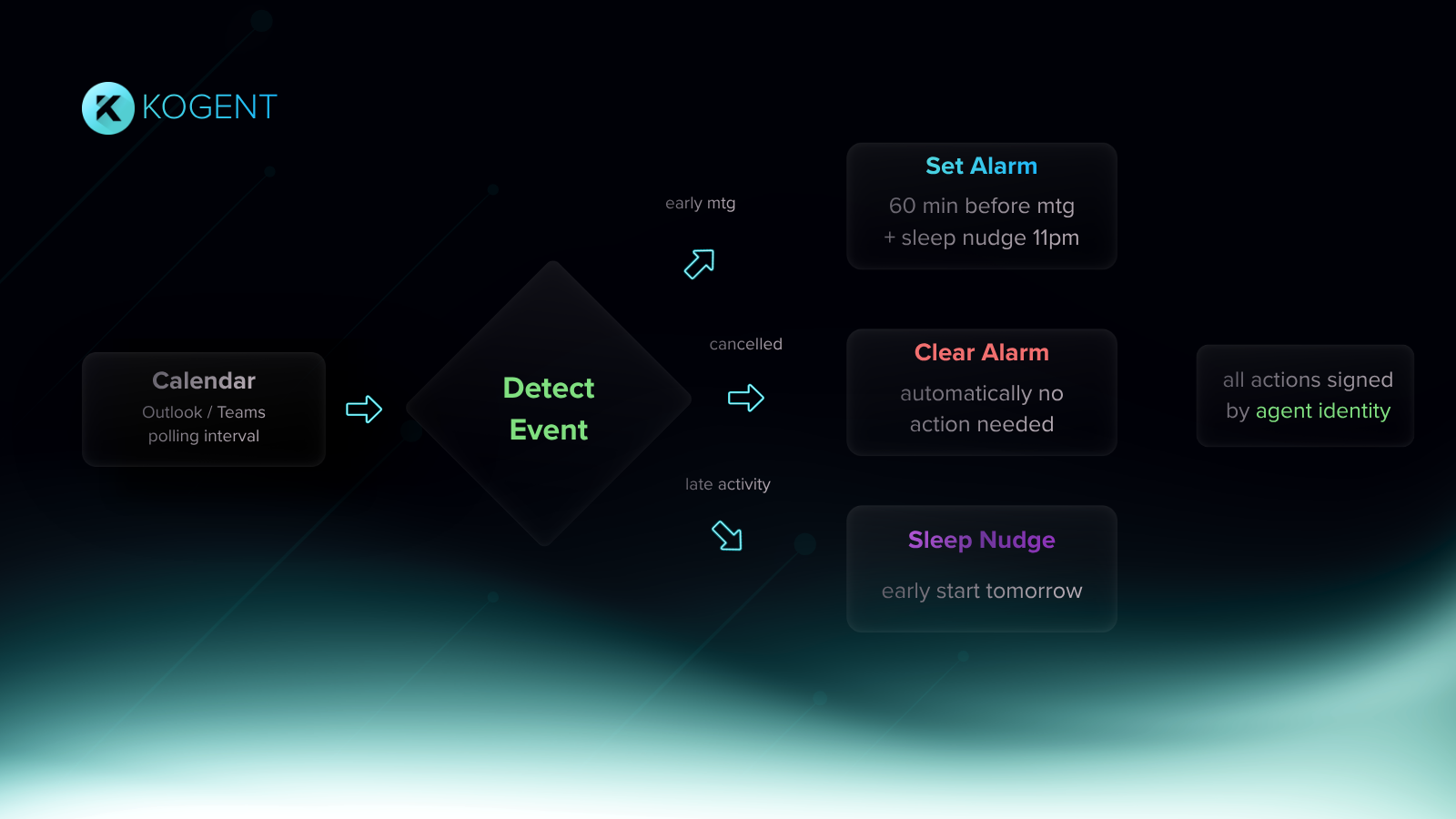
It runs in the background and watches your Microsoft calendar and inbox around the clock. When a meeting is added, moved, or cancelled, Vigil adjusts your alarms without you touching anything. Fifteen minutes before every call, it drops a brief with attendee context and relevant email threads so you show up prepared. Urgent emails get surfaced the moment they land. Everything else gets scored and ranked so nothing important slips through.
When you have a question about your day, you ask it in plain language and Vigil answers. No digging through your calendar. No searching your inbox. Just ask.
Security
Most agent systems do not have a proper security structure. Credentials are stored in plain text config files on disk, passed around as environment variables, or left in local cache files with no encryption. Any process on your machine can read them. Any malicious skill installed from a third party marketplace can exfiltrate them silently. Vigil does not work that way.
On Apple Silicon, your Microsoft account credentials live inside the Apple Secure Enclave. A hardware-bound EC-256 key encrypts them at the chip level. That key never leaves the hardware. Root access cannot extract it. A compromised OS cannot touch it. Similar to how Apple Pay and Touch ID protect your financial and biometric data, Vigil protects your agent credentials inside the same dedicated hardware chip. No process on your machine can read it. No software exploit can extract it.
Every credential access is written to an audit log. Timestamp, action, process, backend. You always know exactly what Vigil touched and when.
Local mode keeps everything on your machine. Your calendar, your email, your conversations with Vigil. Nothing goes anywhere.
Modes
Cloud mode connects to Claude Opus 4.7 via the Anthropic API. Your API key lives in the macOS Keychain. Calendar and email data is processed by the model.
Local mode runs on ollama. Fully offline. No API key needed. Nothing leaves your device.
Chat
Ask Vigil anything about your day in plain language.
Who is in the two PM meeting? What did Sarah say about the contract? Any urgent emails? What does tomorrow look like? When did we last have a board meeting? Vigil searches your calendar and inbox and answers directly.
How to get it
Download Vigil.dmg from kogent.xyz/download. Drag to Applications and open it. Connect your Microsoft account, pick cloud or local mode, and you are running.
Prefer the terminal? Clone the repo, run python3 scripts/setup_keys.py once to store your credentials, then python3 app/vigil_app.py.
Requirements
macOS 13 or later. Apple Silicon or Intel. A Microsoft account. An Anthropic API key for cloud mode. Ollama with qwen2.5:7b or larger for local mode.
Coming next
Gmail and Google Calendar are next. Windows, iOS, and Android follow in Q3 2026. Each platform will use its own native secure storage with the same security guarantees Vigil has on Mac today.